


Introduction
Understanding complex topics can be challenging, especially when they involve technical concepts, complicated processes, scientific theories, or large amounts of information. Reading lengthy explanations is not always the easiest way to learn something new. Sometimes, a simple diagram can explain in seconds what several paragraphs struggle to communicate.
ChatGPT can help solve this problem by transforming complicated ideas into visual explanations, flowcharts, mind maps, and step-by-step diagrams. With the right prompts, users can break down difficult subjects into smaller, more understandable pieces.
Whether you are a student, teacher, software developer, business professional, or content creator, these four ChatGPT prompts can help you make complex information easier to understand.
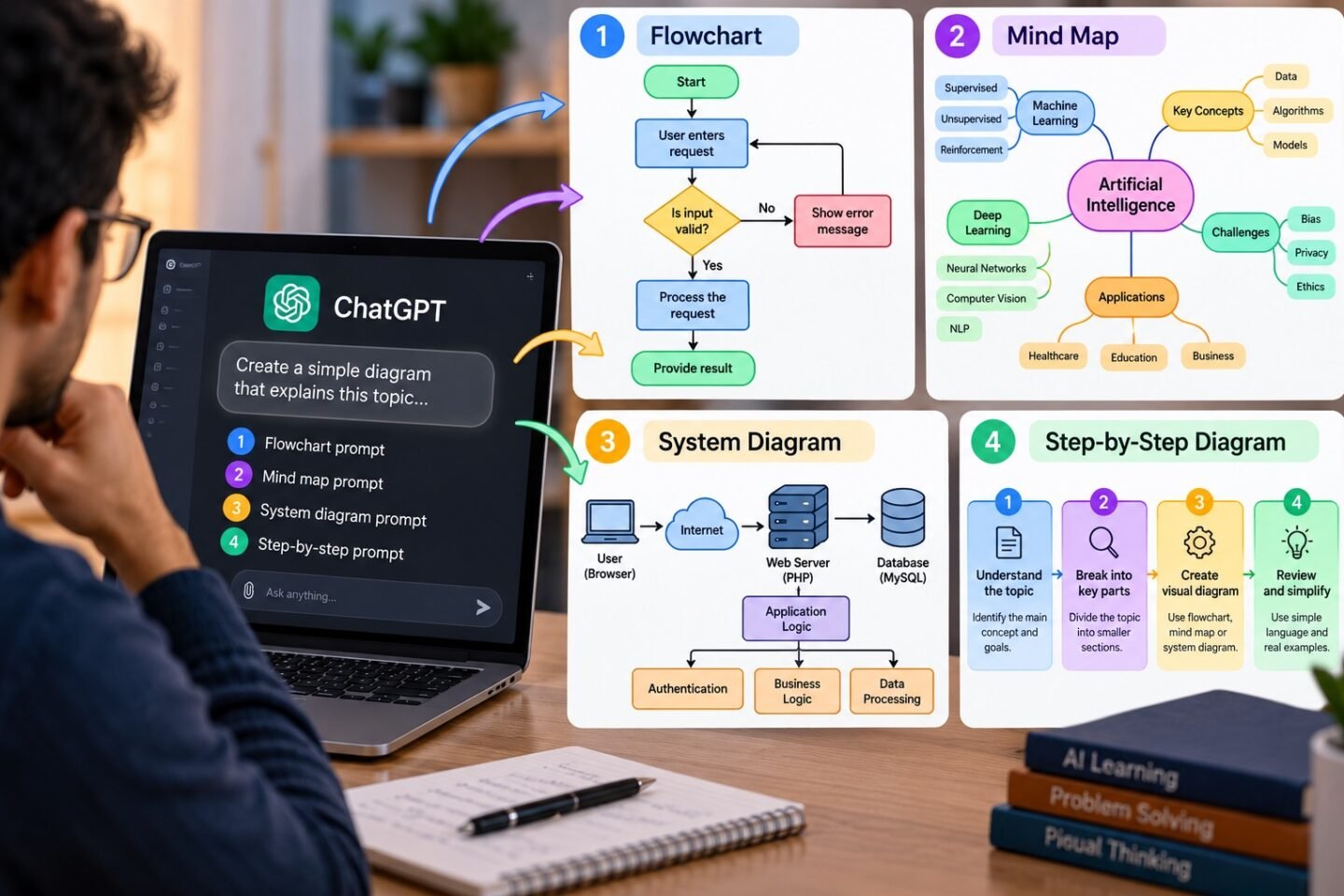
1. Turn Any Complex Topic into a Simple Flowchart
Flowcharts are useful when you need to understand how a process works from beginning to end. They show the sequence of steps, important decisions, and possible outcomes in a visual format.
For example, understanding how a website works, how a payment is processed, or how a computer network transfers data becomes easier when the process is displayed visually.
ChatGPT prompt:
“Explain [TOPIC] using a simple flowchart. Break the process into clear steps, show how each step connects to the next, and include decision points where necessary. Use simple language, short labels, and a practical example. Make the diagram easy for a complete beginner to understand.”
Best for:
- Understanding technical workflows
- Learning software development processes
- Explaining business operations
- Visualising decision-making procedures
Example: A student learning how an online payment works can use this prompt to visualise the journey from clicking the payment button to receiving a successful transaction confirmation.
2. Create a Mind Map for Difficult Concepts
A mind map organises information around a central idea, with branches representing related topics, categories, and supporting details.
This approach is especially helpful when learning a subject with many interconnected concepts. Instead of memorising isolated facts, users can see how the different parts relate to one another.
ChatGPT prompt:
“Create a structured mind map for [TOPIC]. Place the main topic in the centre and organise the key concepts into branches and sub-branches. Include important definitions, examples, and relationships between concepts. Keep each branch concise, use beginner-friendly language, and organise the information logically.”
Best for:
- Exam preparation and revision
- Learning new subjects
- Brainstorming ideas
- Planning projects and presentations
- Organising research notes
Example: Someone studying artificial intelligence can create a mind map covering machine learning, deep learning, neural networks, natural language processing, and real-world applications.
3. Explain a Complicated System with a Visual Diagram
Some topics are difficult because they involve multiple components interacting with one another. Examples include cloud computing, computer networks, database systems, and software architecture.
A system diagram can show the individual components, how they communicate, and where information flows between them.
ChatGPT prompt:
“Create a clear system diagram explaining [SYSTEM OR CONCEPT]. Identify the main components, describe the purpose of each component, and show how they interact using labelled arrows. Include the direction of data flow and explain the complete process in simple language. Avoid unnecessary technical details and provide a real-world example.”
Best for:
- Software architecture
- IT infrastructure and networking
- Database design
- Cloud computing concepts
- Understanding APIs and integrations
Example: A beginner learning web development can use this prompt to understand how a browser communicates with a web server, how the server interacts with a database, and how the response returns to the user.
4. Convert a Difficult Topic into a Step-by-Step Visual Explanation
Some subjects are easier to understand when they are explained in a sequence, with each stage building on the previous one.
A step-by-step diagram can combine short explanations, numbered stages, examples, and arrows to guide the reader through a difficult concept.
ChatGPT prompt:
“Break down [TOPIC] into 5–7 simple steps and turn the explanation into a visual diagram. Give each step a short heading, a one-sentence explanation, and a practical example where useful. Connect the steps in the correct order, define unfamiliar terms, and finish with a short summary of the entire process.”
Best for:
- Learning programming concepts
- Understanding scientific processes
- Explaining complicated business strategies
- Creating educational content
- Preparing training materials
Example: A beginner learning how machine learning works can follow a visual sequence covering data collection, data preparation, model training, evaluation, and prediction.
Tips for Getting Better Diagrams from ChatGPT
The quality of the result depends on how clearly you describe the topic and the type of visual explanation you need.
Follow these practical tips to improve your results:
- Specify your audience: Ask ChatGPT to explain the topic for a beginner, student, manager, or technical professional.
- Keep diagrams focused: Start with the main concepts rather than including every detail.
- Request clear labels: Short labels and directional arrows make diagrams easier to follow.
- Ask for examples: Real-world examples connect abstract ideas to familiar situations.
- Choose the right format: Use flowcharts for processes, mind maps for related ideas, and system diagrams for connected components.
- Verify technical information: Review important facts, calculations, and system relationships before using a diagram professionally.
For more advanced results, ChatGPT can also generate diagram source code in formats such as Mermaid. You can paste supported Mermaid code into a compatible editor or diagram tool to render the diagram. Depending on the prompt and available features, ChatGPT may also help create a visual directly.
Why Visual Learning Matters in the AI Era
Visual explanations are becoming increasingly useful as people work with more complex information. From understanding new technologies to communicating business strategies, diagrams can help people identify relationships, follow processes, and retain key concepts.
AI tools such as ChatGPT make it easier to create these visual learning materials without requiring advanced graphic design skills. Users can start with a basic prompt, review the result, and refine the diagram until it communicates the information clearly.
However, diagrams are most effective when they simplify information without removing essential context. A well-designed visual should make a topic easier to understand, not make an inaccurate explanation look convincing.